Blog
Compile Once, Start Fast: Shipping Python Bytecode in Container Images
How shipping precompiled bytecode in Python container images made new containers start about three times faster, with the measurements, the Dockerfile changes and a way to check your own images.
Recently I helped move a group of Python microservices to uv and Python 3.15. I benchmarked every service before and after, and one change stood out: shipping precompiled bytecode inside the container images. With it, new containers start about three times faster, and the change itself is a few lines in each Dockerfile.
This post explains what that bytecode is, why our containers were rebuilding it on every start, and what changed once they stopped. The services stay anonymous here; they appear as Service A to F, with their APIs and workers.
What Python actually runs
When Python imports a module, it doesn't execute the text of the .py file. It first compiles that text into bytecode: a list of small instructions for the interpreter's virtual machine. This is a two-line function and the bytecode Python 3.15 produces for it:
def greet(name):
    return "Hello, " + name
  1           RESUME                   0

  2           LOAD_CONST               0 ('Hello, ')
              LOAD_FAST_BORROW         0 (name)
              BINARY_OP                0 (+)
              RETURN_VALUE
You can print it yourself with the dis module. LOAD_CONST and LOAD_FAST_BORROW put the string and the argument on the stack, BINARY_OP 0 (+) adds them, and RETURN_VALUE returns the result.
Running these instructions costs the same wherever they came from. Producing them is the expensive part: Python reads the text, tokenizes it, builds a syntax tree, works out what every name refers to, and generates and optimizes the instructions. So Python caches the result. After compiling greet.py, it writes __pycache__/greet.cpython-315.pyc, and the next import loads that file directly as long as it still matches the source.
Why our containers never kept it
In our images, that cache never existed when a container started, for three reasons.
First, the base image ships none. The official python:3.15.2-slim image deletes every .pyc file during its own build to stay small. I counted 694 files in the standard library and 404 more in site-packages, none of them with bytecode.
Second, the installers didn't compile our dependencies. uv, like Poetry, installs packages without bytecode unless you ask for it, and leaves the compiling to the first import. pip is the exception; it compiles by default.
Third, the containers couldn't keep what they compiled. Some workloads run as a non-root user on a read-only root filesystem, and some also set PYTHONDONTWRITEBYTECODE=1. They compile in memory and drop the result when the process exits, so every start pays again, and so does every cron run and every health probe that starts a Python process. The workloads that run as root on a writable filesystem did write .pyc files, but into the container's own layer, which disappears with the container. Every deploy, scale-up and restart on a new node started from zero.
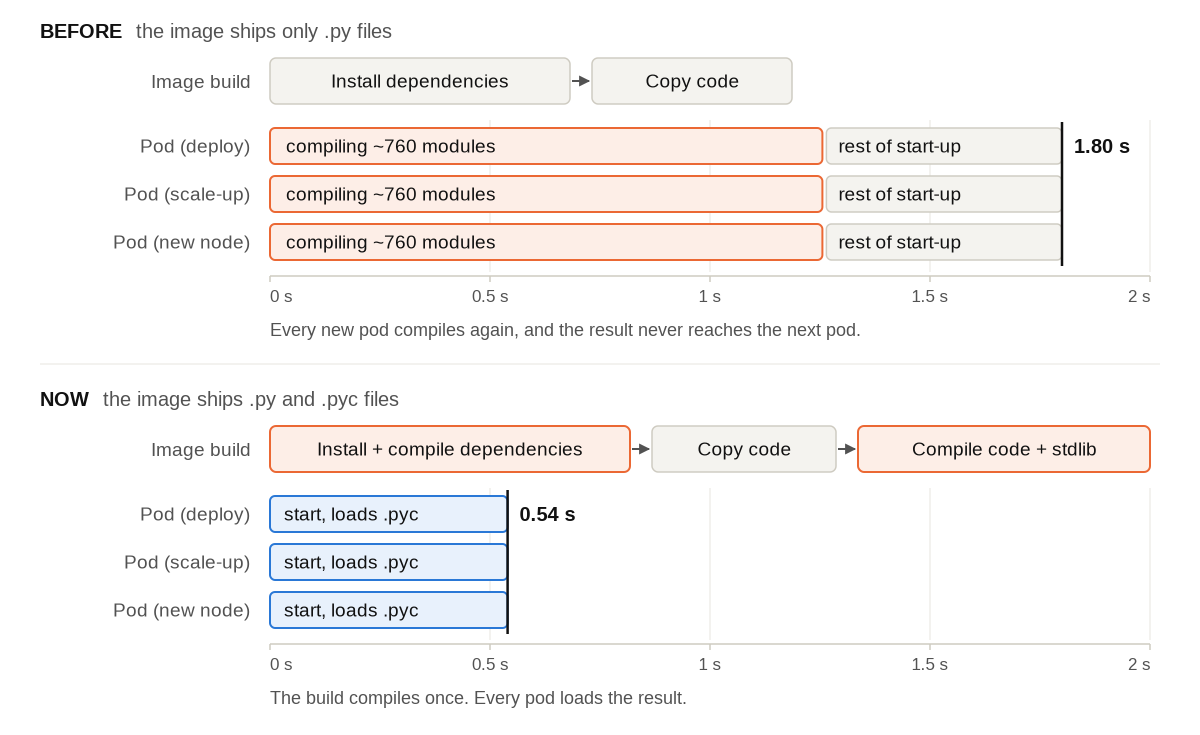
The figure is drawn to scale from one of the APIs, Service F, running on 1 CPU: 1.80 seconds from container start to ready without bytecode, and 0.54 seconds with it. The 1.26-second difference is compiling, and before the change every new container paid it.
The fix: compile once, during the build
The Dockerfiles now do the compiling, in this order:
# Dependencies: uv compiles everything it installs.
RUN UV_COMPILE_BYTECODE=1 \
      uv sync --locked --no-default-groups --no-install-project

# Copy every Python source first...
COPY app /app/app
COPY gunicorn.conf.py entrypoint.sh /app/

# ...then compile the application and the standard library.
RUN python -m compileall -q -j 0 /app \
      "$(python -c 'import sysconfig; print(sysconfig.get_paths()["stdlib"])')"
UV_COMPILE_BYTECODE=1 makes uv compile every package it installs into the virtual environment. It is off by default, and uv's Docker guide recommends it for images.
The compileall step covers what uv doesn't install: our own code and the standard library. -q prints only errors and -j 0 uses every CPU. I read the standard library's path from the interpreter because compileall exits successfully for a directory that doesn't exist, so a mistyped path would skip it without failing the build.
The order matters. Anything copied after the compile step ships without bytecode, so the step comes after the last COPY of Python source. In a multi-stage build, it belongs in the stage that becomes the final image. One of the services builds seven images from one Dockerfile. There, the standard library, the dependencies and the shared code are compiled in layers that all seven images reuse, and each image compiles only its own package, last.
What it changed
For most services I measured three versions: the one running before the migration, the migration to uv and Python 3.15 without bytecode, and the same migration with the bytecode step. Each workload ran the way it runs in production, with its real entrypoint, user and memory limit, in Docker on a laptop with linux/arm64 images and 1 CPU. The migration alone left start-up about where it was. Adding bytecode cut it by about two thirds.
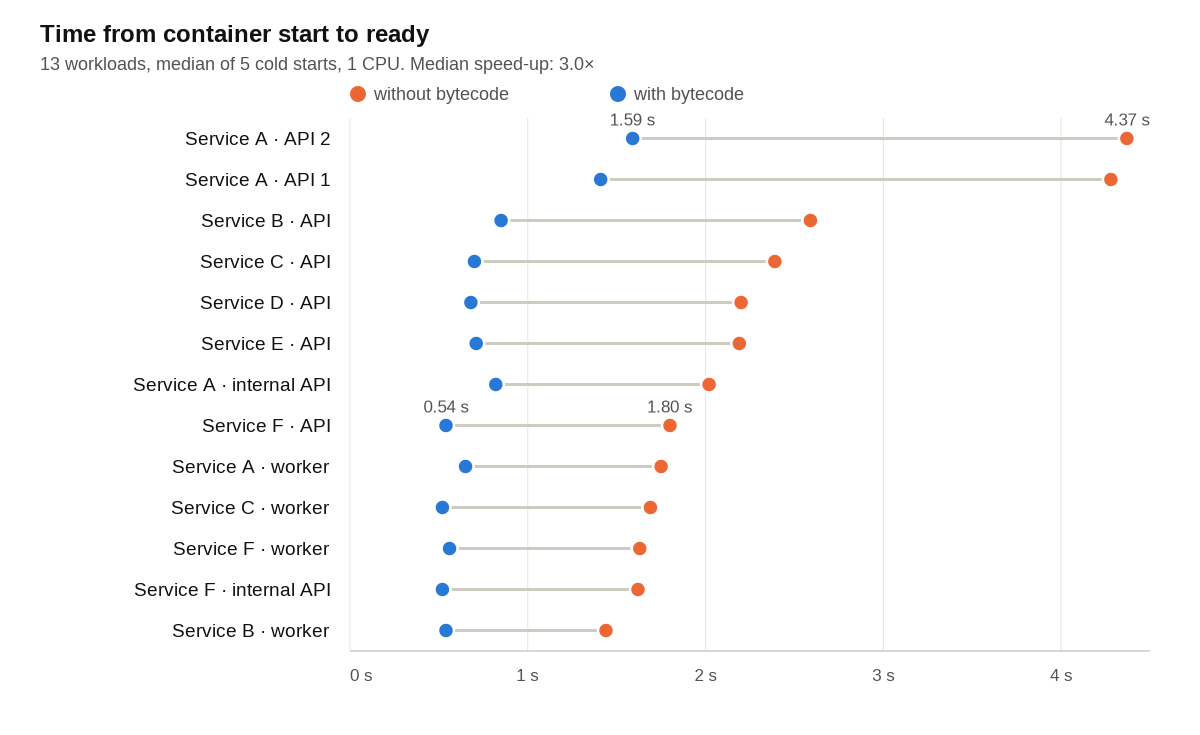
The chart shows the 13 workloads where bytecode was the only change between the two measurements that could affect start-up. Each point is the median of five cold starts. The median speed-up is 3.0×, and the range goes from 2.5× to 3.4×.
A few other results:
- Modules compiled at start went to 0 in every workload I measured. Before, most workloads compiled several hundred modules at each start, up to about 1,100.
- Memory dropped a little too: 9 to 17 MiB less per process in one service, from the bytecode alone.
- In the deployed test environments, the new containers had valid bytecode for 100% of their Python files. The containers they replaced had between 0% and 83%.
The cost is small. Bytecode files take 3 to 16 MB per compressed image, and the build takes a few seconds longer; in one service the cold build went from 45.0 to 49.7 seconds. Every image still ended up smaller than it was before the migration.
Under the hood
What import does
CPython makes the same decision for every module it imports:
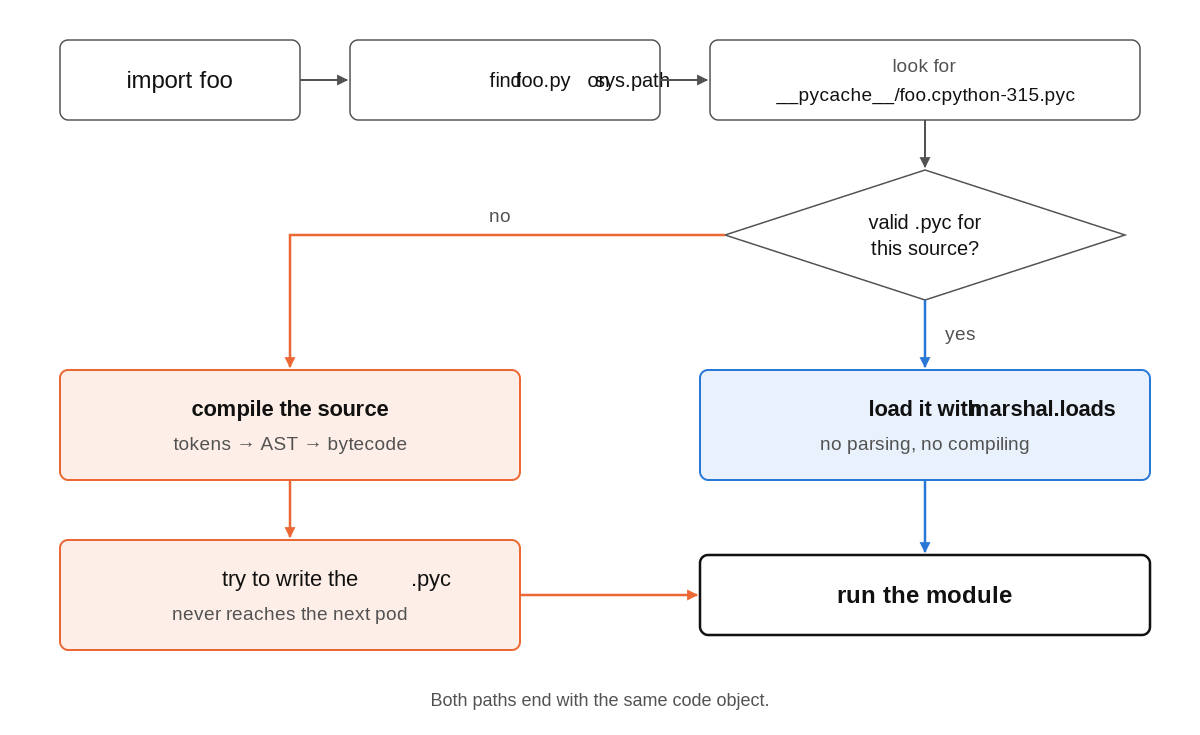
- It finds
foo.pyonsys.path. - It works out the cache path,
__pycache__/foo.cpython-315.pyc. Thecpython-315tag keeps each Python version's files apart. - If that file exists, it reads its header and compares it with the source. If they match,
marshal.loadsrebuilds the code object straight from the file. - Otherwise, it compiles the source and then tries to write the
.pyc. WithPYTHONDONTWRITEBYTECODE=1it skips the write. On a read-only filesystem the write fails and Python ignores the error. - It runs the module's code, which is the same on both paths.
Before the change, every module in our containers took the compile path at every start. Now every module takes the load path.
The 16 bytes that decide
Every .pyc file starts with a 16-byte header, and Python reads only that header to decide whether to trust the file. These are the real bytes of the greet example:
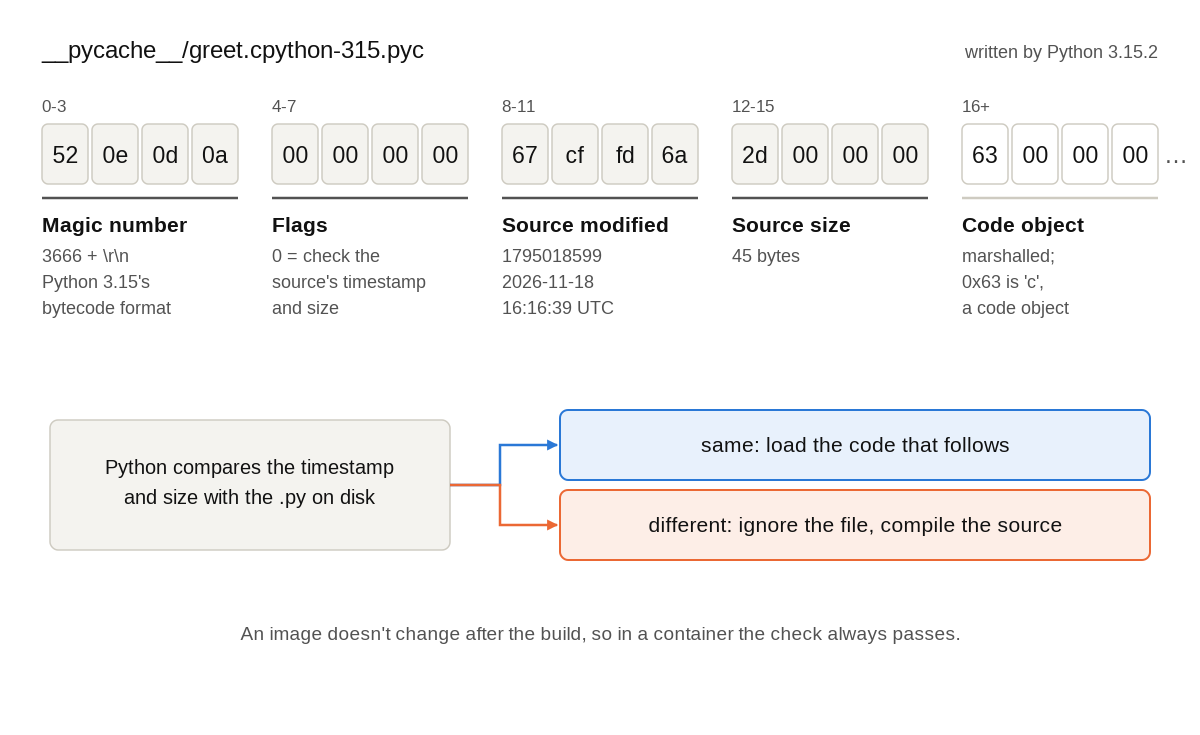
The magic number identifies the bytecode format, which changes between Python versions. The flags say how to validate the file, and 0 means "compare the timestamp and size". Then come the source file's modification time and size, stored lowest byte first. If both match the .py on disk, Python loads the code that follows. If not, it ignores the file and compiles the source.
An image doesn't change after the build, so inside a container the check always passes. A different Python version has a different magic number and a different file name, so it never picks up another version's bytecode. Builds that set SOURCE_DATE_EPOCH get hash-based .pyc files instead (PEP 552), which store a hash of the source in place of the timestamp and size.
Why compiling costs more than loading
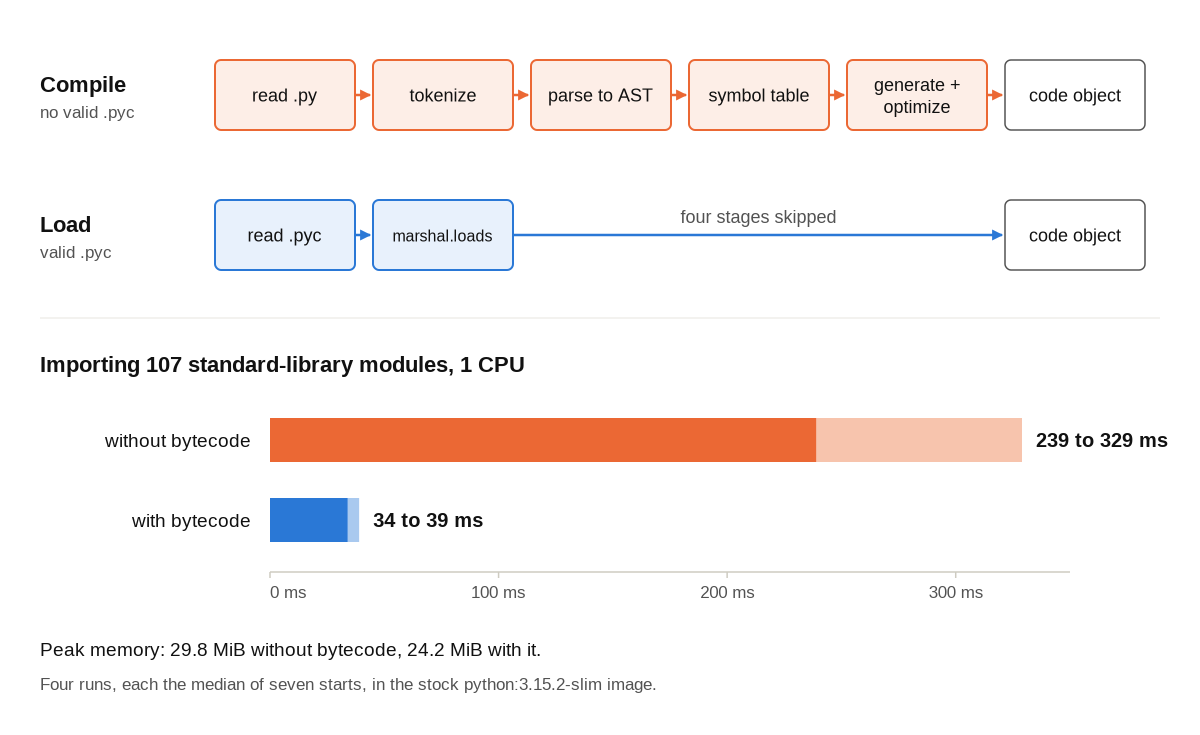
Both paths end with the same code object. Loading skips the stages in the middle, because marshal.loads only rebuilds objects from bytes that are already laid out.
To see the difference without any of our code, I timed the stock python:3.15.2-slim image with 1 CPU while it imported seven common standard-library packages, 107 modules in total. It took 239 to 329 ms without bytecode and 34 to 39 ms with it, over four runs that each took the median of seven starts. Peak memory was 29.8 MiB without bytecode and 24.2 MiB with it.
Memory drops because compiling creates many temporary objects: tokens, syntax-tree nodes and symbol tables. When they are freed, the process mostly keeps that memory for reuse instead of returning it to the operating system, so a process that compiled at start stays larger for its whole life.
Try it yourself
These commands repeat that experiment with Docker:
IMAGE=public.ecr.aws/docker/library/python:3.15.2-slim
TIMED='import time; t = time.perf_counter(); import asyncio, email.message, http.client, json, logging, ssl, urllib.request; print(round((time.perf_counter() - t) * 1000), "ms")'

# Without bytecode: the stock image, read-only.
docker run --rm --read-only --cpus 1 -e TIMED="$TIMED" "$IMAGE" \
  sh -c 'for i in 1 2 3; do python -c "$TIMED"; done'

# With bytecode: compile the standard library first, then time the same imports.
docker run --rm --cpus 1 -e TIMED="$TIMED" "$IMAGE" \
  sh -c 'python -m compileall -q -j 0 /usr/local/lib/python3.15 && for i in 1 2 3; do python -c "$TIMED"; done'
Each command prints three timings. Single runs vary, so compare a few.
To check one of your own images, start Python with -v and import your package. Python logs every code object it builds: a path ending in .py means it compiled that module, and a quoted .pyc path means it loaded bytecode. This counts the compiled ones:
docker run --rm --read-only <image> python -B -v -c "import <package>" 2>&1 \
  | grep -c '^# code object from /.*\.py$'
It should print 0. The stock base image prints 20 for import json.
For a running container, I used a small script that checks each .py file for a .pyc whose header Python would accept. It imports nothing from the application and, run with -B, writes nothing, so it is safe on read-only containers:
import importlib.util, json, os, sys, sysconfig

def check(root):
    total = valid = 0
    for directory, subdirs, files in os.walk(root):
        subdirs[:] = [d for d in subdirs if d != "__pycache__"]
        for name in files:
            if not name.endswith(".py"):
                continue
            source = os.path.join(directory, name)
            total += 1
            try:
                info = os.stat(source)
                with open(importlib.util.cache_from_source(source), "rb") as handle:
                    header = handle.read(16)
            except OSError:
                continue
            expected = (importlib.util.MAGIC_NUMBER + bytes(4)
                        + (int(info.st_mtime) & 0xFFFFFFFF).to_bytes(4, "little")
                        + (info.st_size & 0xFFFFFFFF).to_bytes(4, "little"))
            valid += header == expected
    return {"sources": total, "valid_bytecode": valid}

roots = [*sys.argv[1:], sysconfig.get_path("purelib"), sysconfig.get_path("stdlib")]
print(json.dumps({root: check(root) for root in roots if os.path.isdir(root)}, indent=2))
Save it as check_bytecode.py and pipe it into the container, for example with kubectl exec -i <pod> -- python -B - /app < check_bytecode.py. Every directory should report as many valid files as sources. On the stock base image, none of the 1,098 files under its library directory has valid bytecode.
Things that can trip you up
- Keep the
.pyfiles. Python can run from.pycfiles alone, and dropping the sources saves space, but some code finds its modules by looking for.pyfiles. A plugin registry that scans for files namedprocessor.py, for example, would find nothing. - Compile every directory your code is imported from, including shared code installed from a separate path. A missed directory still works; it just keeps compiling at start.
PYTHONDONTWRITEBYTECODE=1can stay, and so can a read-only filesystem. They only stop writing; reading works the same.- Running with
-Oor-OOmakes Python look for.opt-1.pycor.opt-2.pycfiles instead. Without them it compiles as before: slower, never wrong. - The bytecode is the same one Python would produce at import time, made earlier by the same interpreter. If a
.pycever didn't match its source, Python would ignore it and compile, so the worst case is the old start-up time.
If you build Python images, check whether they ship bytecode. Ours didn't, and fixing it cost a few lines and a few megabytes per image.